
Comprehensive Guide to Selecting the Perfect Printer and Ink Cartridges for Your Needs
Explore this detailed guide to selecting the ideal printer and cartridges tailored to your needs. Learn about different printer types, key features, cost-saving tips, and how to avoid common mistakes. Whether for home, office, or creative projects, make informed choices to optimize your printing experience while saving money and time.
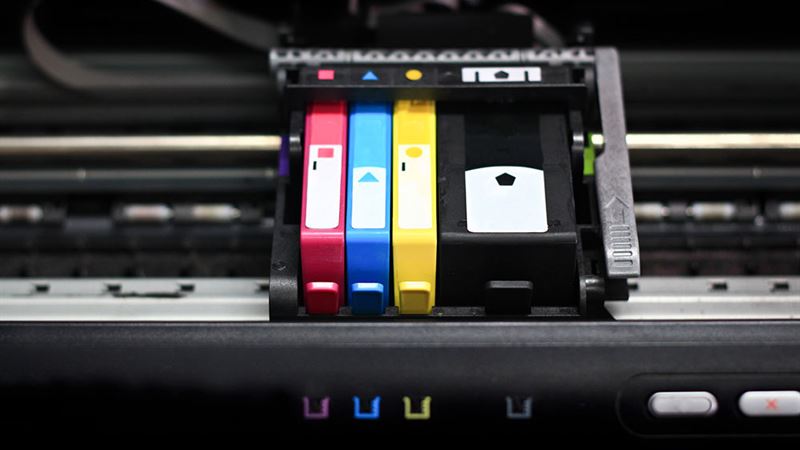
- **Inkjet Printers:** Affordable and versatile, inkjet printers are popular among casual users and small offices. They excel at producing high-quality color images, making them ideal for printing photographs, detailed graphics, and creative projects. The ink cartridges used in inkjet printers are generally standard and readily available. While their cost per page can be higher than other types, their ability to handle diverse media types makes them a top choice for many.
- **Laser Printers:** Laser printers are a preferred choice for business environments that demand fast, high-volume printing with crisp text quality. They are slightly more expensive upfront but offer cost-efficient printing over time due to their toner cartridges' high yield. The toner cartridges are designed to withstand extensive usage, making them suitable for daily office tasks such as printing reports, memos, and spreadsheets.
- **Photo Printers:** Designed specifically for printing high-resolution photographs, photo printers utilize specialized inks and premium paper. They are favored by professional photographers and enthusiasts who need gallery-quality prints. These printers typically support a wider color gamut and can produce vivid, lifelike images on glossy or premium matte paper.
- **Supertank Printers:** Innovative and cost-effective, supertank printers come equipped with large, refillable ink tanks instead of traditional cartridges. They can print thousands of pages before requiring a refill, drastically reducing printing costs and downtime. Ideal for small businesses or households with high-volume printing needs, these printers deliver economical and reliable performance.
- **All-in-One Printers:** Combining multiple functionalities in a single device, all-in-one printers can print, scan, copy, and fax. These versatile machines save space and are perfect for home offices and small businesses. They come with various connectivity options, including Wi-Fi and Ethernet, and often support duplex printing, making document management more efficient.
Before purchasing a printer, consider your primary use case. For occasional, low-volume printing, a basic inkjet model may suffice. For high-volume business printing, investing in a laser printer with high-yield toner cartridges is more economical. Photographers should opt for specialized photo printers with advanced color management. For flexible, space-saving options, all-in-one units are popular among small business owners and home users. Understanding these distinctions ensures you select a device that aligns with your requirements and budget.
Cartridge selection is vital to maintaining print quality and managing costs. Some key points to consider include:
- Standard vs. High-Yield Cartridges: Standard cartridges are typically included with the printer purchase but tend to run out quickly, especially if you're printing in large volumes. High-yield or XL cartridges contain more ink or toner and are designed to last longer, offering better value over time. For heavy printing needs, investing in high-yield cartridges can reduce the frequency of replacements and overall expenses.
- Brand vs. Generic Cartridges: While original brand cartridges guarantee compatibility and stable quality, generic or third-party cartridges often provide similar output at a fraction of the cost. Many users find that high-quality generic cartridges deliver reliable performance without sacrificing print quality, making them a smart choice for cost-conscious buyers.
- Compatibility Checks: Always verify the exact model and specifications before purchasing cartridges. Using incompatible toner or ink cartridges can damage your printer or lead to subpar print results. Pay attention to color configurations—some printers use separate cartridges for black, cyan, magenta, and yellow, while others use combined tri-color cartridges. Replacing only the empty cartridges in the correct configuration will save money and prevent waste.
To maximize your investment, look for printers with features that match your workflow. This includes wireless connectivity options like Wi-Fi, Ethernet, or Bluetooth for easy printing from multiple devices. Support for duplex printing (automatic double-sided printing), SD card readers, or direct printing from mobile devices can significantly enhance productivity and convenience.
- Ignoring Cost-Per-Page Calculations: Focusing solely on initial purchase price can be misleading. High-yield cartridges and printers with lower cost-per-page rates provide long-term savings.
- Overpaying for Brand Name Cartridges: Premium branded cartridges are often priced higher without offering proportional quality benefits. Consider compatible or generic options that meet your quality expectations.
- Misordering or Using Incompatible Supplies: Always double-check cartridge specifications before buying. Using incompatible toner or ink can damage your device and lead to additional replacement costs.
- Neglecting Maintenance and Firmware Updates: Keeping your printer clean and updating firmware ensures optimal performance and prevents avoidable issues.
Choosing the right printer and cartridges requires a blend of understanding your printing volume, quality expectations, and budget constraints. Whether you opt for an economical inkjet, a high-volume laser, a dedicated photo printer, or a versatile all-in-one, selecting compatible, high-yield cartridges will maximize value and performance. Remember, being informed about features and avoiding common pitfalls can save you money and ensure that your printing needs are met efficiently and reliably. Take your time to research and compare options—your perfect printer and cartridge combination is within reach.