
Comprehensive Guide to Computer Peripheral Devices and Their Functions
This comprehensive guide explores various computer peripherals, including internal and external devices such as mice, keyboards, monitors, printers, GPUs, speakers, microphones, network adapters, modems, and joysticks. It highlights their functions, features, and importance in enhancing computer performance. Detailed descriptions help users understand which devices best suit their needs, from gaming and multimedia editing to everyday office work. The article also discusses high-end peripherals for specialized tasks, emphasizing the role of quality hardware in optimizing user experience and productivity across different industries.
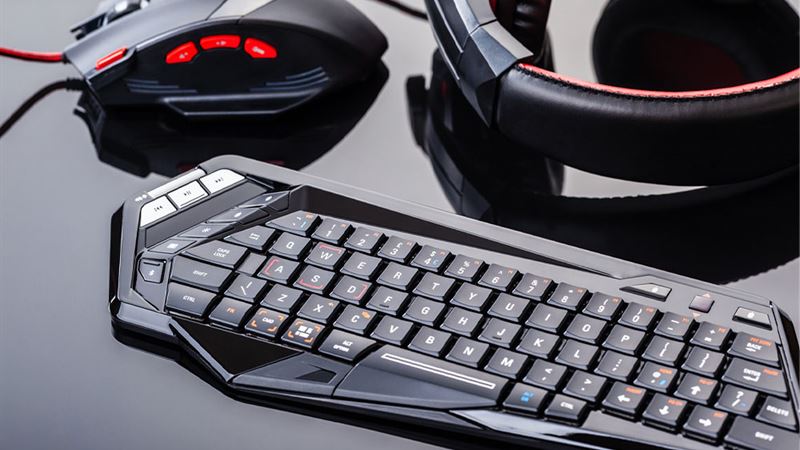
Understanding Internal Peripheral Devices
Internal peripherals are integral components directly connected to the motherboard of a computer system. These include vital hardware components such as memory modules, graphics cards, sound cards, and network interface cards. Internal peripherals are essential for the core functioning of the computer, providing processing power, data storage, and graphical rendering capabilities. Installing or upgrading these components often requires opening the computer case and handling sensitive electronic parts with care, typically necessitating technical expertise.
External Peripheral Devices: Enhancing Connectivity and Functionality
External peripherals are devices that connect externally to a computer, often via USB, HDMI, or other ports. They include devices such as webcams, external hard drives, printers, and speakers. External peripherals expand the computer's capabilities without the need for internal hardware modifications. They are generally easy to install, making them popular options for users seeking to improve or customize their systems for specific tasks like multimedia creation, gaming, or office work.
Let’s explore some of the most common computer peripherals in detail:
- Computer Mouse
The mouse is a fundamental pointing device used to control the cursor on the computer screen. It typically features at least three buttons — left, right, and a scroll wheel — allowing users to perform a range of functions such as clicking, selecting, and scrolling. Modern mice may include additional buttons and adjustable sensitivity for enhanced productivity and gaming. Using a mouse requires a flat surface, like a mouse pad or a smooth desk, to facilitate precise movements. It is an essential device for navigation, graphic design, gaming, and general computer use. - Keyboard
The keyboard serves as the primary input device for text entry and command input. It consists of multiple keys representing alphabets, numerals, symbols, and function keys. Beyond basic typing, many keyboards offer multimedia control keys for adjusting volume, brightness, and other system functions. Mechanical, membrane, or ergonomic designs are available, catering to different user preferences. A keyboard's versatility makes it indispensable for coding, writing, gaming, and multimedia editing. - Display Monitors
Monitors, also called visual display units (VDUs) or screens, are vital peripherals that visually present data generated by the computer. They come in various types, including LCD, LED, OLED, and IPS panels, each offering different advantages in color accuracy, response time, and energy consumption. Monitors are used for viewing documents, videos, images, and running complex visual applications like CAD or gaming. The choice of monitor affects productivity and visual comfort, especially for long hours of work or entertainment. - Printers
Printers are output devices that transform digital documents into physical copies on paper. They come in different types, such as inkjet, laser, and 3D printers, each suited for specific needs and budgets. Printers are used extensively in offices and homes for printing text documents, images, labels, and more. They often connect via USB, Wi-Fi, or Ethernet, enabling wireless or wired printing. High-quality printers support color printing and various paper sizes, making them versatile tools for both personal and professional use. - Graphics Processing Units (GPUs)
GPUs, also known as video cards or graphics adapters, enhance the visual output of a computer by processing complex graphics and images. They connect directly to the motherboard and contain dedicated processors, memory, and cooling systems to handle demanding tasks like 3D rendering, gaming, video editing, and virtual reality. Advanced GPUs support high resolutions, ray tracing, and multi-monitor setups, significantly improving visual performance for professional and entertainment purposes. - Speakers
Audio output peripherals like speakers deliver sound from the computer. They are available as wired or wireless options, with wireless speakers connecting via Bluetooth or infrared (IR). Speakers vary in size, audio quality, and design, from compact desktop units to massive surround sound systems. Some models include built-in subwoofers for enhanced bass, making them ideal for gaming, music, movies, or voice communication applications like video conferencing. - Microphones
Microphones convert sound waves into electrical signals, enabling voice input for various applications. They are essential for online communication, voice recognition, recording, and streaming. Microphones can be built-in, such as in laptops, or external, connected via USB or audio jacks. High-quality microphones reduce background noise and improve sound clarity, critical for professional broadcasting, podcasting, and content creation. - Network Interface Cards (NICs)
Network adapters or NICs enable computers to connect to local networks and the internet. They support wired Ethernet connections or wireless Wi-Fi. NICs facilitate data sharing, online browsing, and network gaming by managing data transmission between connected devices. They support protocols like TCP/IP and handle functions such as error checking and data buffering, ensuring smooth and secure network communication. - Modems
Modems act as bridges between a computer and an internet service provider (ISP). They modulate and demodulate digital signals into analog for transmission over phone lines, cable, or fiber optic networks. Modems are essential for establishing internet connectivity at home or in offices. Advanced models support higher speeds, dual-band Wi-Fi, and additional features like VoIP compatibility, ensuring reliable and fast internet access. - Joysticks
Joysticks are input devices primarily used in gaming and simulation applications. They allow users to control characters, vehicles, or camera angles within a digital environment. Many joysticks feature multiple buttons, trigger switches, and adjustable sensitivity, providing precision control for flight simulators, racing games, and virtual reality experiences. They enhance immersion and responsiveness in gaming scenarios.
The above-listed peripherals represent core hardware components that enhance the functionality of computers. As technology advances, manufacturers offer high-end, specialized peripherals tailored for professional niches such as video editing, 3D modeling, gaming, and streaming. Brands focusing on gamers, content creators, and digital artists develop peripherals with enhanced features, ensuring users can perform demanding tasks efficiently. Choosing appropriate peripherals can significantly improve your productivity, entertainment experience, and overall satisfaction with your computer system. Always consider compatibility, quality, and specific needs when selecting peripherals for your setup.